
Introduce the listing
Lead with the strongest photo and the details someone needs to take the next step.
Listing spotlightYELL SOCIAL FOR REAL ESTATE
Give every listing a clear plan. Bring property content, open houses, and client follow-up into one social workspace for your real estate business.
14 days free · No credit card required
 OPEN HOUSE
A new place to call home.
Give every property a story.


Reveal → Walkthrough → Open house
Independent agents
Brokerages & teams
Property managers
Real estate marketers
FROM JUST LISTED TO WHAT’S NEXT
Build a sequence your team can follow. Connect each piece of content to the next, while leaving room for neighborhood stories and helpful advice.
Lead with the strongest photo and the details someone needs to take the next step.
Listing spotlightPlan a room-by-room tour or a short video that brings the space to life.
Property walkthroughShare the open-house time, location, and a clear way to ask a question.
Open-house reminderAnswer recurring questions and give interested viewers a useful next step.
Follow-up contentAn example weekly plan. Set your own dates, channels, and publishing pace.
THE BIG PICTURE, WITHOUT THE SPREADSHEET
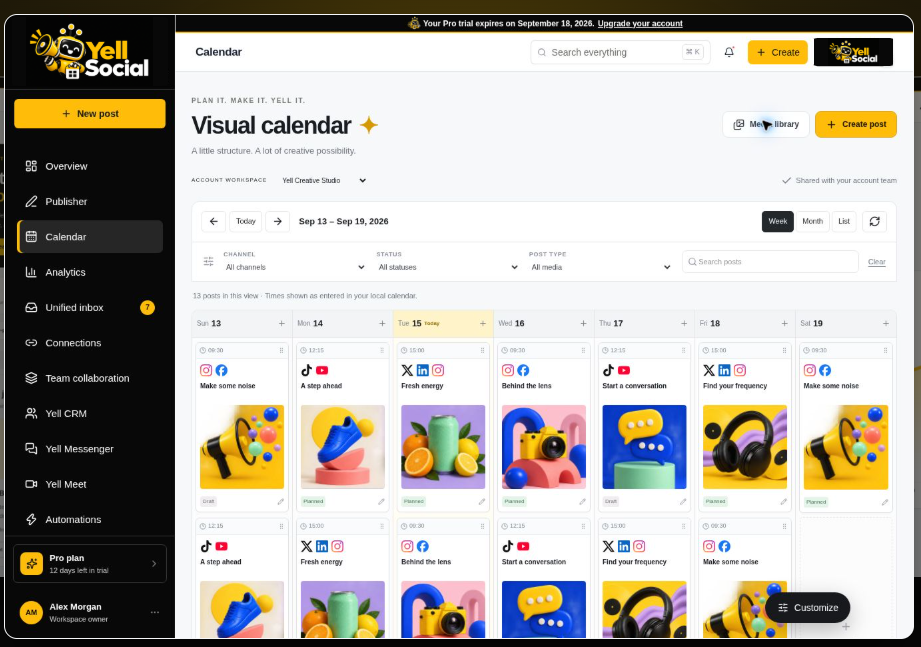
Bring listing photos, walkthrough videos, local updates, and open-house reminders into the visual calendar. See what is coming up before a busy day takes over.
YELL SOCIAL / VISUAL CALENDAR
THE RELATIONSHIP CONTINUES AFTER THE POST
A property question, a client update, a review worth answering. Keep the next step visible so the team knows where to focus.
Use Yell Engagement to organize supported social conversations, assign attention, and keep track of the questions that need a reply.
Explore Yell EngagementKeep prospective client records, conversation notes, and follow-up tasks in Yell CRM. Give your team the context to pick up the next conversation.
Explore Yell CRMUse Yell Review to organize customer feedback and prepare thoughtful responses. With permission, turn client stories into content people can learn from.
Explore Yell ReviewAGENTS. CREATIVES. ONE PLAN.
Keep the agent, photographer, and marketing team aligned on the content, deadline, and next step. Assign work in Team Collaboration and keep the details together in Yell Messenger.
Explore team collaborationProperty details, photos, and walkthrough footage.
Agent + photographerCheck captions, current availability, and the next step.
Marketing + listing agentPlan the dates, assign follow-up, and share updates.
Your account teamREAL ESTATE, REAL QUESTIONS
Find the right workflow for the way your business works.
Talk with our teamYell Social brings content planning, a visual calendar, team tasks, and customer context into one workspace. Use it to coordinate listing launches, open-house reminders, neighborhood stories, and follow-up across your real estate team.
Both can use the same workflow. A solo agent can organize the week's content and follow-up, while a brokerage can coordinate contributors through shared tasks, assigned owners, and team conversations. Compare plans for the team and profile limits that fit your business.
Compare plansBuild a mix of property walkthroughs, listing updates, open-house reminders, local business spotlights, buyer and seller explainers, and team introductions. Keep property details current, use media you have permission to share, and review each post before publishing.
Yes. The visual calendar lets you organize image and video content by date. Plan the listing reveal, walkthrough, reminders, and follow-up together so your team can see the campaign in context.
Start with the Integrations directory to review each network's connection status and supported capabilities. Choose the channels available to your workspace and adapt each post to the format and audience you want to reach.
Explore integrations
YOUR NEXT LISTING. YOUR NEXT CHAPTER.
Plan the content. Connect the team. Keep the conversation moving.
Start your free trial See pricing