Yell Social
THE SOCIAL COMMAND CENTER

Social media management.
Be heard everywhere.

Yell Social is social media management software for small businesses, agencies, and marketing teams. Plan and schedule content, organize customer relationships, and collaborate in one customizable dashboard.

Install Yell SocialWeb app for your phone, tablet, or computer
One workspace 12 networks Built for teams

One voice across every channel that matters

FacebookInstagramYouTubeLinkedInTikTokXPinterestThreadsBlueskyGoogle BusinessTumblrWhatsApp

Third-party apps and integrations

Bring your favorite tools into one connected workflow. Explore the Yell Social app roadmap for creative, collaboration, and customer tools.

Explore other 3rd party integrations
TAKE A LOOK INSIDE

Your entire workflow.
One connected workspace.

Eight tools. One connected dashboard. Press play, or explore at your own pace.

Yell Social dashboard previews. Sample account data.

Make it your workspace
MEET YOUR EVERYDAY ADVANTAGE

Big ideas.
Even bigger possibilities.

From the first spark to the next conversation.
Make space for the work that makes your brand stand out.

01 / PLAN

Make your next move
a well-planned one.

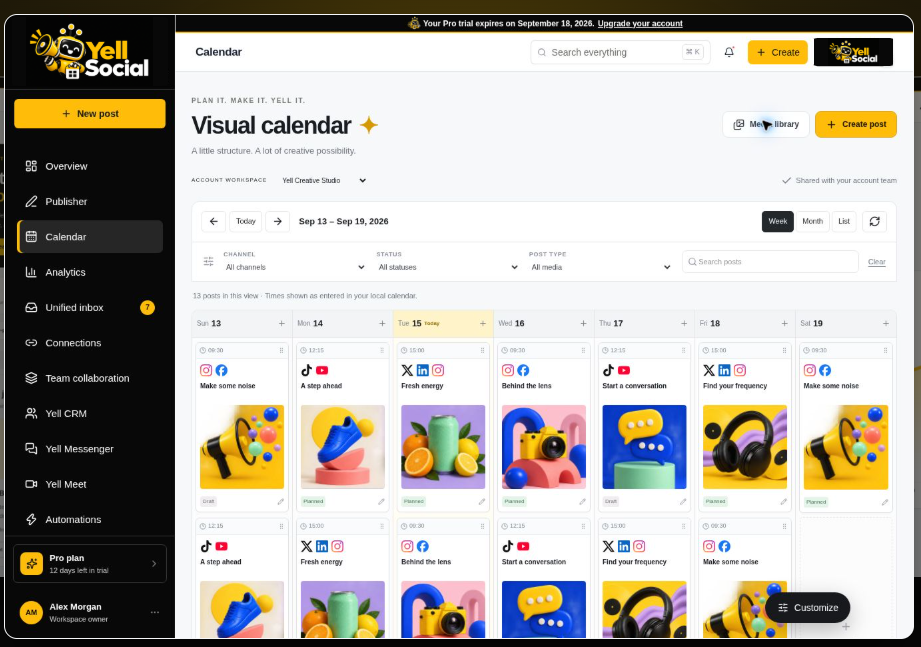
See your ideas take shape in a visual calendar. Bring images, videos, channel captions and your team’s plans together before you publish.

  • Visual planning
  • Channel captions
  • Media library
Explore the visual calendar
YOUR WEEK, IN FOCUS Content plan
Yell Social calendar preview with colorful posts arranged across the week
A little structure.
A lot of possibility.
Draft → Review → Plan
restaurants campaign inspirationtravel campaign inspirationecommerce campaign inspiration
Illustrative workflow · Sample content
02 / CREATE

Less blank-page panic.
More “that’s the one.”

Turn a brief into a starting point with the free AI post generator. Refine the voice, explore formats and make every draft unmistakably yours.

  • Fresh ideas
  • Your tone of voice
  • Human review
Try the free post generator
FROM BRIEF TO BRIGHT IDEA
YOUR NEXT POST STARTS HEREA fresh idea for our
weekend launch…
ConfidentFriendlyPlayful
instagramfacebooklinkedintiktok
Pixel, Yell Social’s yellow robot, holding a megaphone
Make it sound like you.Create. Review. Refine.
Illustrative workflow · Sample content
03 / ENGAGE

Give every conversation
a clear next step.

Organize saved messages and review records with Yell Engagement. Keep notes, ownership and response drafts together so the team can follow through.

  • Shared ownership
  • Review workflows
  • Reply drafts
Meet Yell Engagement
Yell Social teammates reviewing customer conversations
Yell EngagementEXAMPLE

“Love this! Where can I learn more?”

RESPONSE DRAFT

Thanks for asking! Let’s help you find the right next step.

Assigned to your team
Pixel ready to help with a reply
Illustrative workflow · Sample content
04 / DISCOVER

Find the spark.
Make it your story.

Explore search trends, browse industry templates and turn a timely topic into your next content idea. Start with inspiration. Finish with your perspective.

  • Search trends
  • Industry inspiration
  • Free resources
Explore what’s trending
INSPIRATION IS EVERYWHERE
Food & drink content inspirationFood & drink
Real estate content inspirationReal estate
Travel content inspirationTravel
YOUR NEXT CONTENT ANGLEBig conversations.
Your unique point of view.
How-toBehind the scenesCommunity
Ideas → Templates → Your next draft
Illustrative workflow · Sample content
05 / COLLABORATE

Great social starts
with a connected team.

Bring contacts, tasks and team conversations into the same workspace. Give every campaign an owner, keep the brief close and make the next handoff easier.

  • Yell CRM
  • Team tasks
  • Yell Messenger
Bring your team together
Two marketing teammates planning a campaign together in a yellow and black studio
One campaign. One team.
01Campaign briefReady
02Creative reviewIn progress
03Customer follow-upAssigned
Better together.
Louder together.
Illustrative workflow · Sample content
WHY YELL SOCIAL?

Your brand. Your people.
Your way of working.

Make it your workspace

Make it yours

Personalize your dashboard with your logo and colors.

Keep the context

Bring customer relationships, team tasks and conversations together.

Know what to expect

Clear capabilities, saved work and tracked support requests.

View current capabilities and publishing options
BUILT AROUND REAL TEAMWORK

Where great social work comes together.

From the first campaign idea to the performance review, Yell Social gives every teammate the context to make the next move count.

Two social media strategists planning a campaign together in a black and yellow studio01

Plan the story

Shape the campaign together before production begins.

Social media manager scheduling content in a black and yellow creative studio02

Publish with confidence

Turn approved ideas into polished channel-ready content.

Customer engagement teammates reviewing audience conversations together03

Stay close to customers

Give every message the fast, human response it deserves.

Agency team reviewing social media performance in a modern boardroom04

Turn results into direction

Read the signals together and decide what to amplify next.

Explore every Yell Social feature
YOUR WORKSPACE, CONNECTED

Great work starts
with a connected team.

Your next customer, campaign, and conversation. Bring them all together with one unmistakably Yell Social experience.

A new relationshipA clear next stepA shared conversationYour brand, everywhere
BUILT FOR AGENCIES

Everything you need
to scale your agency.

Create faster, protect every client brand, and turn performance into the next clear move—all from one connected command center.

Campaign studioYELL SOCIAL
A launch campaign. Three ways to tell it.
The launch
Behind the brand
Meet the team
Brand voice: Confident3 concepts
Make it sound like you.
CAMPAIGN BRIEF

A fresh perspective. A bigger conversation.
Your next chapter starts here.

InstagramLinkedInFacebook
Prepare variations
One brief. Every channel.
01 / CREATE

Yell AI Campaign Studio

Give every client a distinctive voice. Shape ideas, captions, and channel-ready variations from one focused brief.

Explore the workflow
02 / ENGAGE

Thoughtful replies. Less busywork.

Keep conversations moving with suggested replies your team can review before sending.

Explore the workflow
JLJamie L.Instagram

Love this launch. Where can I find out more?

SUGGESTED REPLY

Thanks, Jamie! We’d love to show you what’s new. Here are the details.

Ready for your review
Creative reviewFeedback resolved
Approved
Brand reviewFeedback resolved
Approved
3
Client approvalAwaiting final sign-off
In review
ALJMSK
Everyone in the loop.
03 / CONTROL

Approval Runway

Clear review stages. Visible ownership. A confident handoff from draft to publish.

Explore the workflow
04 / ORGANIZE

Every client. In its own space.

Keep brand profiles, permissions, calendars, and reporting neatly separated.

Explore the workflow
Client workspaces3 BRANDS
N
North StudioLifestyle
Workspace
F
Forma LivingInteriors
Workspace
F
Fieldwork Co.Outdoor
Workspace
05 / DISCOVER

Make the next move a smarter one.

Read audience and engagement trends together. Turn campaign performance into a clearer direction.

Explore the workflow
Campaign performanceSAMPLE DATA
ENGAGEMENTS24,680
Across connected channels
Week 1Week 2Week 3Week 4
Launch campaignTEAM TASKS
Finalize creative directionAL
Prepare channel variationsJM
SK

@Jamie — updated brief attached. Ready for your next pass.

06 / COLLABORATE

A team that moves together.

Create tasks, assign owners, and keep communication attached to the work—not scattered across tools.

Explore the workflow

Illustrative workflow previews. Sample brands and data shown.

Move from thought to published in minutes.

Your best content should not disappear inside a complicated workflow. Yell Social keeps creation, approvals, scheduling, and reporting connected.

  1. 1
    Connect your channels

    Bring every brand profile into one secure workspace.

  2. 2
    Build your campaign

    Adapt copy and creative for each audience without starting over.

  3. 3
    Schedule and learn

    Publish at the right moment, then use the results to sharpen the next post.

Open the workspace
BUILT FOR MOMENTUM

One platform.
Every growth loop.

Growing brand team reviewing social media performance
For small businesses

Social media management for small business: keep your content calendar, customer follow-ups, and team tasks organized as you grow.

Explore tools for small businesses
REPRESENTATIVE EARLY FEEDBACK

Built for teams
who want to move.

Social teams value a clearer way to plan, collaborate, and understand what is working.

The calendar gives our whole team one clear view of what is going live, where it is going, and who needs to approve it.

Jordan M.
Agency operations leadProduct preview participant

I can see the content, conversations, and results without opening a dozen tabs. That clarity is exactly what a growing brand needs.

Taylor B.
Small-business founderProduct preview participant

The approval flow keeps client feedback organized and gives our creators more time to do the work that actually moves campaigns forward.

Cameron S.
Client services managerProduct preview participant

Being able to compare every channel in one report makes our weekly review faster and gives the team a much clearer next move.

Morgan L.
Growth marketing leadProduct preview participant

The unified inbox means comments do not get lost between platforms. We can respond faster and keep the brand voice consistent.

Casey W.
Community managerProduct preview participant

Scheduling once and tailoring the post for each network saves hours without making the final content feel copied and pasted.

Riley K.
Content strategistProduct preview participant

The campaign view helps leadership understand what is planned without slowing the creative team down with another status meeting.

Avery D.
Brand marketing managerProduct preview participant

Moving between client workspaces feels organized and predictable. Our team always knows which brand and approval stage they are viewing.

Jamie P.
Agency account directorProduct preview participant

The best-time recommendations take the guesswork out of our calendar while still leaving us in control of every scheduled post.

Drew H.
Social media coordinatorProduct preview participant

Seeing audience growth beside engagement gives us a more useful picture than isolated numbers from separate platform dashboards.

Sydney C.
Digital analytics managerProduct preview participant

Yell Social makes a small team feel much bigger. We can plan ahead, stay responsive, and understand performance without extra tools.

Parker T.
Startup marketing leadProduct preview participant

Our review process is easier to follow because feedback, revisions, and approvals live alongside the content they belong to.

Reese G.
Creative project managerProduct preview participant

The dashboard surfaces the information I need without burying it. I can spot momentum and make decisions in a few minutes.

Quinn N.
Ecommerce founderProduct preview participant

One connected workflow gives our regional teams freedom to create while helping us protect the standards that make the brand recognizable.

Leslie F.
Multi-location brand leadProduct preview participant

The combination of scheduling, engagement, and reporting creates a clean handoff from publishing a campaign to learning from it.

Blake J.
Marketing operations managerProduct preview participant
Representative feedback is shown to preview the testimonial experience; verified customer stories will replace it as they become available.
GET TO KNOW YELL SOCIAL

Your social workflow,
explained.

From your first content calendar to a shared workspace for your team, find the tools that fit the way you work.

Common questions.
Clear answers.

Need help choosing a plan or setting up your workspace?

Talk to Yell Social
What is Yell Social?

Yell Social is social media management software that brings content planning, scheduling, engagement, analytics, and customer organization into one workspace. Small businesses, agencies, and marketing teams can coordinate their social media work alongside Yell CRM, team tasks, and Yell Messenger. Explore all Yell Social features.

Is Yell Social for small businesses or agencies?

Yell Social supports both. Small businesses can organize their content and customer follow-ups in a shared workspace. Agencies can coordinate client campaigns, collaborate on content, and manage account work. Compare the workflows for small businesses and agencies, then choose a plan based on your social accounts and team size.

How do the scheduling tools and content calendar work together?

Use the visual calendar to plan when each post belongs in a campaign. Create your content, tailor it to the channel, review it with your team, and organize its scheduled time. Publishing options depend on the connected network and its permissions. Our social media content calendar guide explains how to build a repeatable planning workflow.

Does Yell Social include CRM and team collaboration tools?

Yes. Yell CRM organizes contacts and opportunities alongside shared tasks. Team collaboration tools help account members coordinate their work, while Yell Messenger keeps internal conversations in the same workspace. The unified social media inbox is a separate tool for supported audience messages and comments. Explore the collaboration features.

Which social media platforms can I use with Yell Social?

The Yell Social integrations directory covers Facebook, Instagram, YouTube, LinkedIn, TikTok, X, Pinterest, Threads, Bluesky, Google Business, Tumblr, and WhatsApp. Available actions vary by platform, account type, authorization, and plan. Check the integrations directory for platform details; third-party apps marked “coming soon” are on the roadmap.

Can I customize my social media dashboard?

Yes. Choose from 30 dashboard styles, add your own corner images or logos, adjust colors, and arrange widgets around your workflow. You can keep the information your team uses most close at hand, including social media analytics and custom metrics. See dashboard customization and other features.

What can I review in the social media analytics dashboard?

The analytics workspace brings reach, engagement, audience growth, and campaign reporting into one view. Use those metrics to compare content and plan your next campaign. Available metrics depend on the network and account connection. The social media metrics guide explains which measures answer common performance questions.

Can I manage social engagement and customer reviews together?

Yell Engagement organizes supported messages, comments, and review conversations in a shared inbox. Yell Review helps your team organize feedback, prepare responses, and manage review requests. Available actions depend on the connected platform and its permissions.

How do Yell Bots help with repetitive marketing tasks?

Yell Bots lets you save reusable instructions for content ideas, campaign drafts, and engagement responses. Review and edit each result before using it. Your team stays in control of what gets shared with customers. Explore the Yell Social workspace.

How much does Yell Social cost, and is there a free trial?

Yell Social offers a 14-day free trial with no credit card required. Essentials starts at $21 per month when billed monthly. Plans vary by social accounts, team size, and included features; annual billing options are also available. Compare current plans and pricing or start your free trial.

READY TO MAKE SOME NOISE?

Your audience is already listening.

Give your team one clear place to create, publish, respond, and grow.

Start with Yell Social
DISCOVER YOUR NEXT CONVERSATION

What people are searching for in the United States · Google Trends

Explore all trends

Loading the latest search trends…